
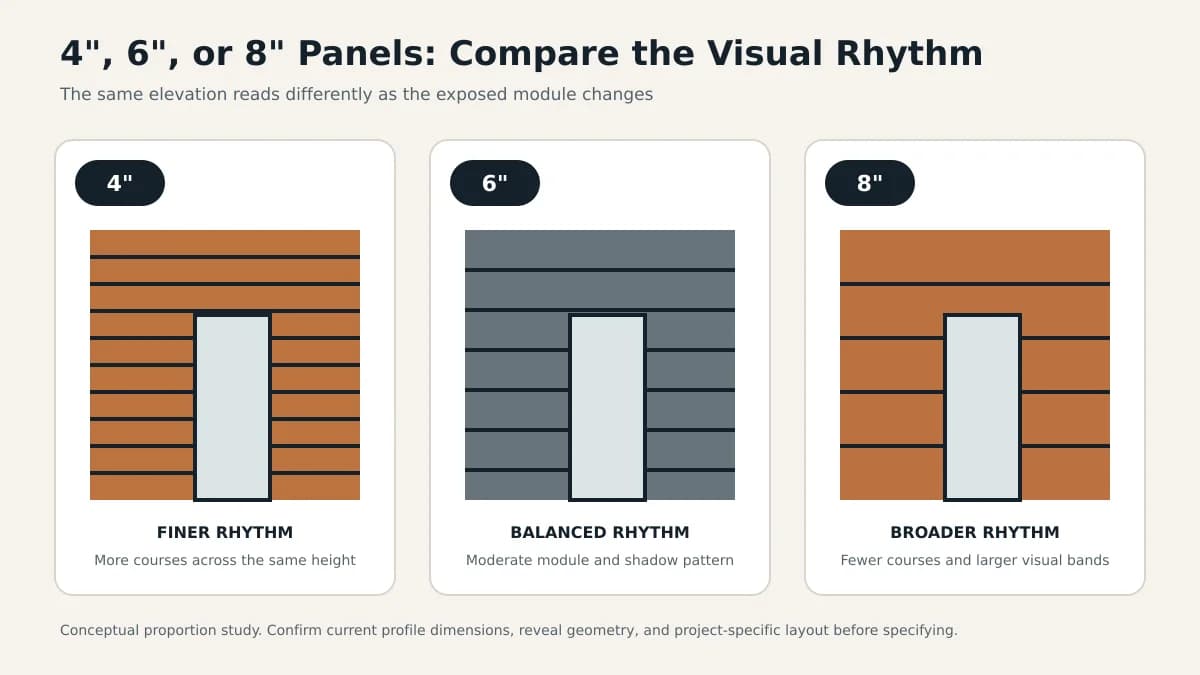
Panel width changes the rhythm, joint count, edge conditions, and perceived scale of a façade. This guide provides a practical way to compare 4-inch, 6-inch, and 8-inch concepts without treating one width as a universal default.
Key Takeaways
- There is no universally correct panel width; select the module in the context of the whole elevation.
- Narrower modules usually create more frequent joints and a finer rhythm, while wider modules create fewer visual divisions and broader fields.
- Viewing distance, orientation, openings, corners, trims, and shadow-line geometry can matter more than building height alone.
- Confirm actual face coverage, reveal dimensions, available lengths, supports, and accessories in current manufacturer documents.
- Compare full-size samples and a representative elevation mockup before approving the module.
The short answer: use a narrower module when the design needs a finer, more frequent rhythm; use a wider module when it needs broader fields and fewer visual divisions; and use a middle width when neither effect should dominate. Treat that as an editorial starting point, not a product rule. Within the broader architectural cladding design process, the correct selection depends on the complete elevation, actual viewing distances, openings, corners, orientation, finish, attachment, fabrication, and current manufacturer data.
Define Width Before Comparing It
Nominal profile width, exposed face, coverage, and module spacing are not always the same dimension. The reveal or joint also contributes to the visual course. Before laying out an elevation, identify which dimension appears in the product literature and obtain current profile drawings. Barcode-specific face coverage, reveal geometry, lengths, tolerances, clips, and trims are product data: compare the available aluminum cladding panels against current technical specifications rather than inferring dimensions from this general design guide.
How 4-Inch, 6-Inch, and 8-Inch Concepts Tend to Read
Width changes joint frequency and the proportion between the panel face and shadow line. The descriptions below are general visual tendencies, not guaranteed effects or recommendations for a particular Barcode profile.
| Nominal-width concept | Typical visual tendency | Useful questions | Potential limitation |
|---|---|---|---|
| 4-inch | Fine-grained, frequent linear rhythm | Will the texture remain legible at the principal viewing distance? | More courses and joints may increase layout and installation activity |
| 6-inch | Intermediate rhythm that balances face and joint | Does it coordinate cleanly with openings, story lines, and corners? | A neutral-looking module can still create awkward cuts without elevation planning |
| 8-inch | Broader fields and fewer visual divisions | Does the larger face suit the profile depth, finish, and wall scale? | The module may appear visually heavy in small or highly articulated zones |
Evaluate Scale and Viewing Distance
A module seen from a sidewalk can read differently from the same module viewed across a parking area or street. Study at least the closest public view, the common approach view, and a distant contextual view. Building height alone is an incomplete shortcut: setbacks, landscape, façade length, window spacing, color contrast, reveal depth, sun angle, and lighting all influence whether joints read as texture or as broad bands.
- Print or model elevations at consistent scales with joints shown.
- Create perspective views from actual approach points rather than relying only on orthographic elevations.
- Review daylit, shaded, and nighttime conditions where lighting is part of the design.
Coordinate Orientation, Openings, and Edges
Horizontal courses emphasize length and must resolve sill, head, parapet, and grade relationships. Vertical courses emphasize height and must coordinate with bays, jambs, corners, and top and bottom terminations. Diagonal or mixed layouts add cutting, support, drainage, and transition questions. Test each candidate module at windows, doors, corners, penetrations, material changes, and short return walls—not only in an uninterrupted field.
Mix Widths Only With a Clear Rule
Mixed modules can establish hierarchy, align with adjacent materials, or prevent repetitive cuts. They can also look accidental and complicate takeoffs, staging, support layouts, transitions, and replacement stock. Use a repeatable sequence tied to an architectural datum, and ask the manufacturer and installer to confirm compatibility. Do not assume different profiles share identical clips, reveals, depths, or transition details without current Barcode documentation.
Mock Up the Width With the Finish
Width and finish selection should be reviewed together. A dark reveal against a light face can make the joint frequency more prominent; a wood-look grain can add another directional scale; gloss and metallic finishes can change with light. Compare full-size panel and finish samples in project lighting and, for consequential elevations, a mockup that includes multiple courses, a corner, a trim condition, and a representative opening.
Common Specification Mistakes
- Using nominal width without confirming exposed face, coverage, and reveal dimensions
- Selecting from one elevation view without testing actual viewing distances
- Ignoring partial modules at openings, corners, soffits, and material transitions
- Assuming wider always means faster or less expensive without an installer takeoff
- Changing width without coordinating supports, clips, trims, drainage, and movement details
- Approving a small color chip without reviewing width, joint, orientation, and finish together
A Practical Selection Workflow
Shortlist two modules, apply both to the same coordinated elevation, and compare joint count, edge cuts, opening alignment, corners, transitions, waste assumptions, and visual intent. For an elevation with many cuts or mixed widths, a material quantity takeoff can help test the waste assumptions. Then review current profile data with the manufacturer and installation implications with the contractor. Approve the result through samples and a mockup rather than choosing a width by building type alone.
Barcode availability, profile dimensions, accessories, lead times, installation requirements, and pricing are product-specific and may change. Confirm them directly before issuing construction documents or orders.
Frequently Asked Questions
Which aluminum cladding panel width is best?
No width is best for every project. Compare how each module works with viewing distance, façade proportions, openings, orientation, finish, joints, edge conditions, fabrication, installation, and current product availability.
Do wider cladding panels make installation faster?
Not necessarily. Fewer courses may reduce some repetitive work, but panel geometry, supports, clips, cuts, openings, access, tolerances, crew experience, and handling can outweigh width alone. Ask the installer to compare the actual elevations.
Can different aluminum panel widths be mixed?
They can be when the selected system supports the combination and the layout follows a clear rule. Confirm profile depths, clips, reveals, supports, trims, transitions, drainage, movement, and replacement planning with current manufacturer details.
Should panel width be chosen before the finish?
Develop them together. Color contrast, gloss, metallic effects, wood-look grain, reveal color, and lighting can make the same module read differently. Review full-size samples and a representative mockup.
Sources & Further Reading

About the author
Jay Zdun
Founder, Barcode Cladding
Jay Zdun is the founder of Barcode Cladding. He specializes in aluminum façade systems and helps architects, builders, and property owners evaluate profiles, finishes, and installation considerations for modern exterior projects.
Connect on LinkedIn